If your Google Ads campaign is getting clicks but not enough leads, sales, calls, or bookings, the problem may not be your budget. Very often, the problem is that the account is quietly spending money in places you never intended.
A Google Ads audit helps you find those leaks before increasing your budget. In this guide, you’ll learn how to audit an existing Google Ads account step by step, including how to analyze the Search Terms report, identify wasted clicks, check location targeting, verify conversion tracking, review keywords and ads, and build a practical negative keyword list.
Why You Should Audit Google Ads Before Increasing the Budget
One of the most common mistakes advertisers make is increasing the budget when a campaign is underperforming.
For example, imagine a campaign spending £50 per day and generating 10 clicks. If only two of those clicks come from genuinely relevant prospects, increasing the budget to £100 per day doesn't solve the underlying problem. It can simply increase the amount of money being wasted.
An audit should answer five basic questions:
- Where is the money going?
- Are the searches relevant?
- Are the right people seeing the ads?
- Are conversions being tracked correctly?
- Are campaigns, keywords, ads, and landing pages aligned?
Don't judge an account from one metric alone. A low CTR, high CPC, or low conversion rate can have different causes depending on the campaign structure and business model.
The 15-Point Google Ads Audit Checklist
Use the following checklist when auditing a Search campaign. Work through the points in order rather than immediately changing bids or adding more keywords.
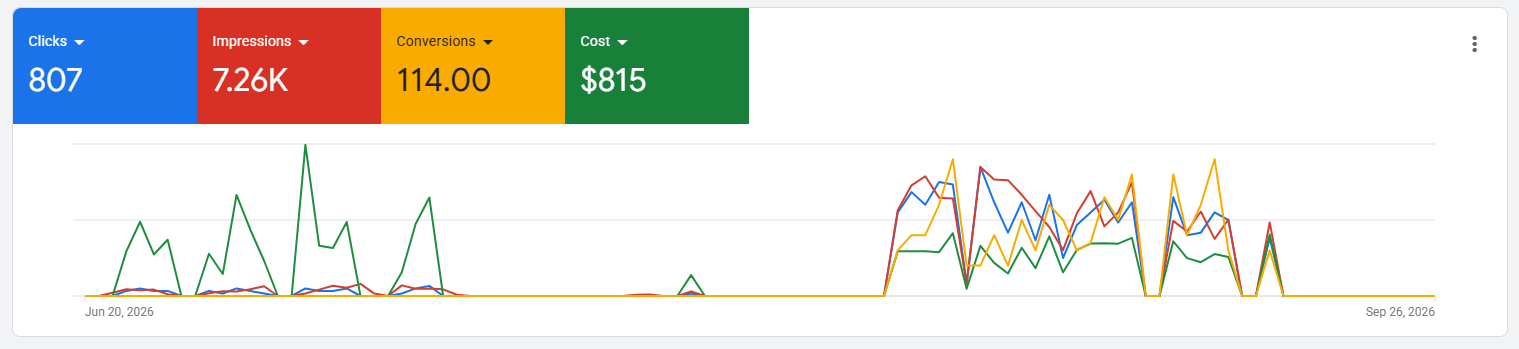
1. Check Total Spend and Conversion Performance
Start with the big picture.
Look at a meaningful date range rather than judging the account from one or two days. Review:
- Total spend
- Impressions
- Clicks
- CTR
- Average CPC
- Conversions
- Conversion rate
- Cost per conversion
- Conversion value, if applicable
Then ask: How much money has actually been spent, and what business result did that spending produce?
For lead generation, a £20 CPC isn't automatically bad if the resulting lead is worth hundreds or thousands of pounds. Likewise, a £2 CPC isn't automatically good if the traffic never becomes a customer.
2. Audit the Search Terms Report
This is one of the most important parts of a Google Ads audit.
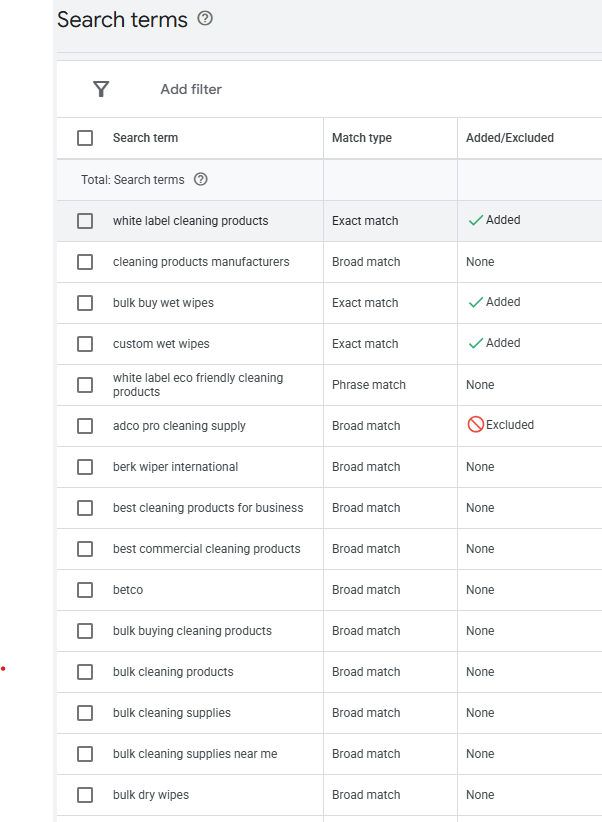
The Search Terms report shows the actual searches that triggered your ads on the Search Network. Google specifically recommends using this report to identify irrelevant searches and generate negative keyword ideas.
Go to your campaign's search terms data and review the queries behind your clicks.
For every significant search term, classify it as:
- Relevant → Keep
- Potentially relevant → Monitor
- Irrelevant → Exclude
For example, suppose you advertise a professional web development service and discover clicks from searches such as: free website builder, website templates free, web development course, website developer jobs, how to learn web development.
Those searches may generate impressions and clicks, but they aren't necessarily searches from people looking to hire your company. That's where wasted spend begins.
3. Block Wasted Spend With Negative Keywords
Once you've identified irrelevant searches, add appropriate negative keywords.
Negative keywords prevent your ads from serving for searches containing excluded terms. Google also allows negative keyword lists to be created and applied across relevant campaigns.
A practical starting list for many service businesses may include terms such as:
But don't blindly add every word to every account.
A person searching for "free consultation" could actually be a valuable customer. The correct negative keyword strategy depends on what you sell.
Google also notes that negative keywords behave differently from positive keywords: they don't automatically cover all close variants, so review the actual unwanted searches you want to block.
4. Check Match Types
Review the match types being used by the campaign.
Look at whether keywords are: Broad match, Phrase match, Exact match. Then compare them with the actual search terms they're generating.
The objective isn't to eliminate broad match automatically. The objective is to understand whether the campaign's matching behavior is producing commercially relevant traffic.
If a keyword repeatedly generates irrelevant searches, investigate the keyword, match type, search terms, negatives, ad relevance, and landing page together before making a decision.
5. Review Location Targeting
Location settings can quietly create wasted spend.
Google Ads can target people based on their physical location as well as locations they're interested in, depending on the campaign's location settings. Google provides a "Presence" option for advertisers who only want people who are likely to be located or regularly located in the selected areas.
This matters particularly for businesses that only serve a specific geographic market.
For example, if a local company only serves customers physically located in London, review whether the campaign is allowing people outside London who merely showed interest in London.
Go into the campaign's location settings and verify that the targeting option matches the actual service area. Also check targeted countries, targeted cities, excluded locations, radius targeting, and location performance.
Remember that Google's location detection is based on multiple signals and isn't guaranteed to be 100% accurate.
6. Check Location Performance
Selecting the correct location settings isn't enough.
Review performance by geographic area.
You might discover that:
- One city generates most conversions.
- Another location consumes significant spend without leads.
- A particular region has an unusually high CPC.
- Some locations receive clicks but no meaningful business results.
This gives you evidence for deciding whether geographic targeting needs adjustment. Don't exclude a location simply because it has one bad day. Look for meaningful patterns.
7. Audit Conversion Tracking
Never optimize a campaign before confirming that its conversion tracking works.
Imagine a campaign has generated five genuine enquiries, but Google Ads records zero conversions. From Google's perspective, the campaign looks unsuccessful. You might then change keywords, ads, bidding, or budget based on incorrect data.
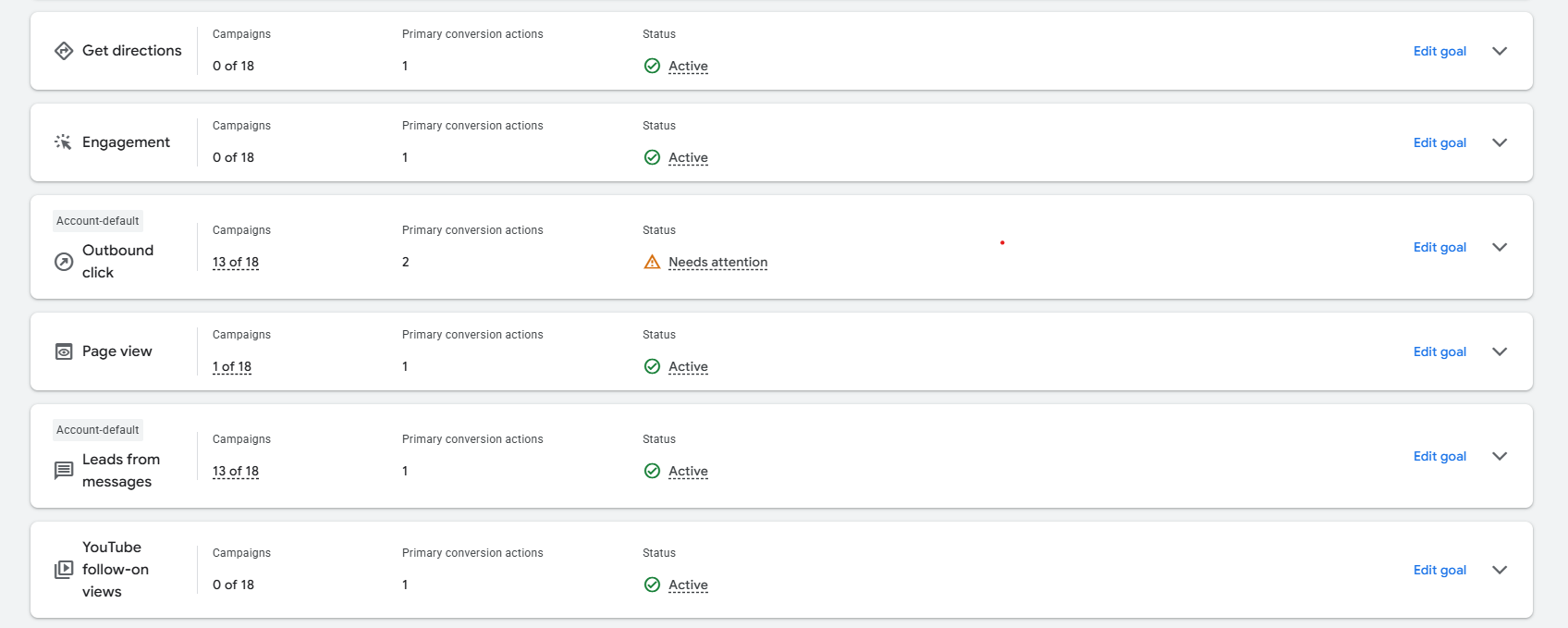
Check: Form submissions, phone calls, purchases, booking confirmations, important button clicks, thank-you pages, conversion values, and primary vs secondary conversion actions.
Google recommends checking the conversion action's status and using tools such as Google Tag Assistant to verify that tags are firing correctly.
8. Look for Duplicate Conversions
Conversion tracking can also fail in the opposite direction. Instead of under-reporting conversions, your setup may count the same action multiple times.
For example, a form submission could potentially be counted through: Google Ads directly, Google Analytics import, Google Tag Manager, A plugin, A thank-you page, or A button-click event.
Review your implementation carefully. Google specifically warns about duplicate tagging and recommends checking for multiple or legacy tags when troubleshooting measurement.
9. Test Every Conversion Yourself
Don't simply look at the tracking status and assume everything works. Perform a real test.
For a lead-generation website: Visit the landing page, complete the form, submit it, confirm the lead reaches the business, check whether the conversion event fires, and verify that the conversion appears correctly in Google Ads.
Do the same for important phone or button actions. A conversion marked "active" doesn't replace an actual end-to-end test.
10. Audit Keywords
Now move from search queries to your actual keyword list. For each keyword, ask:
- Is it directly relevant?
- Does it represent buying intent?
- Is it producing useful searches?
- Is it generating clicks without conversions?
- Is another keyword covering the same intent?
- Does the landing page clearly satisfy the search?
Don't add dozens of keywords simply because a keyword tool suggests them. A smaller set of highly relevant keywords can be easier to analyze and optimize than a huge list of loosely related terms.
11. Check Ad Relevance
Read your ads as if you're the person searching.
If someone searches: "Google Ads agency for dentists" and your advertisement simply says: "Digital Marketing Services | Grow Your Business" there is a disconnect.
Your ads should clearly communicate: What you offer, Who it's for, Why someone should consider you, and What action they should take.
Review headlines, descriptions, calls to action, offers, and landing-page alignment.
12. Audit Landing Pages
A Google Ads campaign doesn't end when someone clicks. The landing page has to continue the conversation started by the search and advertisement.
Check: Page load speed, Mobile experience, Headline relevance, CTA visibility, Form usability, Trust signals, Contact information, Pricing or offer clarity, Testimonials or proof, Navigation distractions, Broken buttons or forms.
For example, an ad promising "Google Ads Management for UK Dental Clinics" should take the visitor to a page that immediately explains that service—not a generic homepage where the visitor has to search for it.
13. Review Device Performance
Compare performance across: Mobile, Desktop, and Tablet.
A campaign may appear healthy overall while one device produces significantly weaker results. Check conversion rate and cost per conversion, not just clicks.
For example, 70% of clicks being mobile traffic doesn't automatically mean mobile is performing well. The important question is whether mobile visitors complete valuable actions.
14. Review Ad Schedule
Look at when your ads are receiving traffic and conversions.
Break performance down by: Day of week, Hour of day, Business hours, and After-hours traffic.
This can reveal patterns such as expensive clicks arriving outside operating hours. However, don't automatically remove evenings or weekends just because conversion volume is lower. Compare the actual conversion economics before making scheduling decisions. A lead received at 8 PM could still be valuable if someone follows up the next morning.
15. Review the Account Structure and Change History
Finally, look at the overall account structure.
Check: Campaign organization, Ad groups, Keyword grouping, Negative keyword lists, Conversion actions, Location settings, Networks, Bidding strategy, Budget allocation, and Recent changes.
Then open the Change History. This is particularly useful when a campaign's performance suddenly changes. You may discover that someone recently: Changed keywords, Increased budget, Added locations, Changed bidding, Removed negatives, Edited ads, or Changed conversion settings.
Without reviewing change history, you may incorrectly blame the market for a problem caused by an account change.
The Negative Keyword Checklist
There is no universal negative keyword list that should be pasted into every Google Ads account. Instead, build your list around search intent.
For many service campaigns, investigate whether these categories are relevant exclusions:
Learning Intent:
Employment Intent:
Free / DIY Intent:
Research Intent:
Depending on the business, other irrelevant commercial intent might include: used, second hand, wholesale, supplier, manufacturer, repair, parts.
Important: Treat this as an audit checklist, not a universal copy-and-paste list. A word can be valuable in one business and completely irrelevant in another.
A Simple Way to Find Wasted Spend
When auditing an account, sort your search terms by cost. Then work downward.
For each expensive search term, ask three questions:
- Was the search relevant?
- Did the visitor have commercial intent?
- Did the visitor produce a valuable action?
This creates a practical prioritization system. For example:
| Search Term | Spend | Relevant? | Action |
|---|---|---|---|
| Service + location | £42 | Yes | Keep |
| Free service | £31 | No | Negative |
| Service course | £27 | No | Negative |
| Competitor comparison | £19 | Maybe | Monitor |
| Exact service | £16 | Yes | Keep |
The goal isn't to make every search convert. The goal is to understand where the money is going and whether the traffic matches the business objective.
How Often Should You Audit Google Ads?
There isn't one perfect schedule for every account. For a new campaign with limited data, check search terms and tracking regularly enough to catch obvious waste, but avoid making major changes after every few clicks.
For an established account, a practical routine can include:
- Weekly: Review search terms, negative keywords, conversions, spend, and obvious anomalies.
- Monthly: Review locations, devices, ad performance, landing pages, budget allocation, and broader keyword trends.
- After major changes: Check conversion tracking and performance after changing tags, landing pages, campaigns, bidding, locations, or account structure.
The more significant the change, the more important it is to document what changed and when.
What You Should Do After the Audit
An audit isn't valuable simply because you produce a long list of problems. Turn your findings into actions.
Prioritize them like this:
- Fix tracking problems first.
- Stop clearly irrelevant traffic.
- Correct location targeting.
- Fix major keyword/search-intent mismatches.
- Improve ad-to-landing-page relevance.
- Review devices and schedules.
- Then consider bidding and budget changes.
This order matters because there's little value in optimizing bidding against unreliable conversion data. Google's own documentation emphasizes correct conversion measurement and tag verification as part of accurate campaign measurement.
Conclusion: Don't Scale Waste
A Google Ads audit isn't about finding a magic setting that suddenly makes every campaign profitable. It's about systematically removing uncertainty.
The 15 checks give you a framework for finding the most common sources of wasted spend: Irrelevant search terms, Missing negative keywords, Poor location targeting, Incorrect conversion tracking, Duplicate conversions, Weak keyword intent, Poor ad relevance, Weak landing pages, Inefficient devices or schedules, Unexplained account changes.
Most importantly, don't increase a campaign's budget simply because it needs more traffic. First establish that the existing traffic is relevant, measurable, and capable of producing the business result you actually care about.
Google's Search Terms report, location controls, conversion diagnostics, and negative keyword tools give you the underlying data needed to make those decisions.